3 Ways to Automate Business Processes for Stress-Free Days

Automate Business Processes with three proven methods: workflow automation tools, communication and scheduling automation, and accounting or invoicing automation. Businesses that use automation see less stress and more efficiency. According to industry surveys, 65% of knowledge workers feel less stressed, and 90% believe automation improves their work lives.
Statistic | Percentage |
|---|---|
Knowledge workers feeling less stressed due to automation | 65% |
Knowledge workers believing automation improved their work lives | 90% |
Businesses using automation to standardize workflows | 76% |
Business Management becomes easier when routine Sales and HR tasks run automatically. Imagine days with fewer manual chores, more time for important work, and smoother operations.
Key Takeaways
Automation reduces stress for employees by handling repetitive tasks, allowing them to focus on more important work.
Using workflow automation tools can significantly improve efficiency and productivity in daily operations.
Identifying repetitive tasks is the first step in automation; focus on tasks with clear rules for the best results.
Start small with automation projects to build confidence and learn what works best for your business.
Regular monitoring of automated processes helps catch issues early and ensures smooth operations.
Continuous improvement is key; regularly review and update automated processes to keep them effective.
Effective communication and training help employees adapt to new automation tools, reducing resistance to change.
Choosing the right automation tools that integrate well with existing systems is crucial for success.
Automate Business Processes: Key Phases
Business process automation follows four main phases. Each phase helps organizations improve efficiency and reduce errors. Many companies use AI and business process automation (BPA) tools at every stage. The table below shows how each phase contributes to process improvement:
Phase | Contribution to Process Improvement |
|---|---|
ASSESS | Helps organizations understand RPA's value and develop a roadmap for automation, identifying areas for improvement. |
DEVELOP | Involves setting up the RPA environment and creating bots, ensuring the automation solution is functional and well-documented. |
ADAPT | Focuses on user adoption and training, addressing resistance to change and ensuring employees can effectively use the new system. |
MAINTAIN | Provides ongoing support and monitoring post-implementation, ensuring the automation continues to function smoothly and efficiently. |
Analysis Phase
Identifying Repetitive Tasks
The first step in the analysis phase is to find tasks that repeat often. These tasks usually take up a lot of time and can slow down business operations. Companies can use data analysis to spot bottlenecks and errors. They can also ask employees for feedback to uncover issues that data might miss. The table below lists best practices for identifying repetitive tasks:
Best Practice | Description |
|---|---|
Data Analysis | Analyze data to identify bottlenecks and errors in processes. |
Employee Feedback | Gather insights from employees to uncover issues not highlighted by data. |
Focus on Repetitive Tasks | Target tasks that are frequently repeated for automation, as they yield the greatest efficiency gains. |
Evaluate Task Variation | Automate tasks with less variation, as they are easier for technology to handle. |
Assessing Automation Potential
After identifying repetitive tasks, organizations must decide which tasks are best for automation. Tasks with little variation and clear rules work well with automation tools. For example, automated follow-ups with emails, data synchronization, and creation of status reports are common choices. Companies that Automate Business Processes in this way often see faster results and fewer mistakes.
Implementation Phase
Selecting Automation Tools
Once the analysis phase is complete, the next step is to choose the right automation tools. Teams should look for tools that match their business needs and can handle the tasks identified earlier. Many organizations select tools that offer easy integration with existing systems. Popular options include workflow automation platforms and robotic process automation (RPA) software.
Setting Up Processes
After selecting tools, teams set up the automation processes. They configure the software to handle the chosen tasks. This step includes creating clear instructions and testing the system to make sure it works as expected. Well-documented processes help teams Automate Business Processes smoothly and prepare for future updates.
Tip: Start with a small project to test the automation setup. This approach helps teams learn and adjust before expanding automation to other areas.
Maintenance and Support
Automation does not end after implementation. Businesses must maintain and support automated processes to ensure smooth operation. Maintenance and support help organizations avoid disruptions and keep systems running efficiently.
Monitoring Performance
Teams monitor automated processes to check if they work as expected. They use dashboards and reports to track key metrics. These metrics include task completion rates, error counts, and processing times. Monitoring helps teams spot issues early and fix them before they affect business operations.
Note: Regular monitoring prevents small problems from becoming major setbacks.
Many companies use specialized tools for performance monitoring. These tools provide real-time alerts when something goes wrong. For example, if an automated invoice fails to send, the system notifies the team. This quick response reduces downtime and keeps workflows on track.
The table below shows common metrics for monitoring automation performance:
Metric | Purpose |
|---|---|
Task Completion Rate | Measures how many tasks finish on time |
Error Count | Tracks mistakes or failures in processes |
Processing Time | Checks how long tasks take to complete |
System Uptime | Monitors how often systems stay online |
Teams review these metrics regularly. They set benchmarks to compare current performance with past results. If performance drops, they investigate and make adjustments.
Continuous Improvement
Continuous improvement keeps automation effective over time. Teams update processes to match changing business needs. They collect feedback from employees and analyze performance data. This information helps them find areas for improvement.
Tip: Small changes can lead to big gains in efficiency.
Companies follow a cycle of improvement. They plan updates, test new solutions, and measure results. If the update works well, they apply it across the system. If not, they revise and try again. This approach ensures that automation stays relevant and valuable.
Some best practices for continuous improvement include:
Reviewing automation workflows every quarter
Training staff on new features and updates
Using AI tools to suggest process enhancements
Documenting changes for easy reference
Continuous improvement also involves keeping software up to date. Teams install patches and upgrades to fix bugs and add new features. They check compatibility with other systems to avoid conflicts.
Maintenance and support create a foundation for successful automation. By monitoring performance and pursuing continuous improvement, businesses ensure that automated processes deliver lasting benefits.
Workflow Automation Tools

Streamlining Routine Tasks
Workflow automation tools help businesses handle repetitive tasks with greater speed and accuracy. These tools reduce manual work and free up employees for more important projects. Many organizations use platforms like Power Automate, Salesforce Flow, and Zapier to manage daily operations.
Task Automation Examples
Businesses use workflow automation to handle tasks such as sending follow-up emails, processing invoices, and updating customer records. These tools can also automate appointment scheduling and data entry. Kathryn Schwab, founder of Make It Count Creative Solutions LLC, describes how automation supports her business:
"It makes sure leads get followed up with, invoices go out on time and appointments are scheduled effortlessly — all while giving customers a better experience," Schwab explained.
Automating these tasks leads to measurable improvements. For example, a midsize healthcare provider achieved a 60% reduction in patient registration cycle time by automating form processing and digital signatures. This change resulted in a 20% decrease in staffing costs and a 15% increase in patient satisfaction scores.
Other benefits of workflow automation include:
Improved productivity: Automating daily tasks allows employees to focus on more critical work, increasing overall productivity.
Fewer bottlenecks: Workflow automation can significantly reduce process bottlenecks, allowing businesses to scale effectively.
Recent surveys show that 64.4% of daily users of AI automation experience significant productivity improvements. In addition, 74% of enterprises using generative AI report a return on investment within the first year.
Workflow Optimization
Workflow automation tools do more than just handle tasks. They optimize entire processes by connecting different systems and ensuring information flows smoothly. When businesses Automate Business Processes, they often see fewer errors and faster results. These tools help teams standardize procedures, track progress, and identify areas for improvement. As a result, companies can adapt quickly to changes and maintain high levels of efficiency.
Getting Started with Workflow Automation
Many businesses want to implement workflow automation but do not know where to begin. The following steps provide a clear path for getting started.
Setup Steps
Assess and Map Current Workflows
Teams start by reviewing existing processes. They identify which tasks take the most time and where delays occur.Define Goals and Success Metrics
Next, they set clear goals for automation. These goals might include reducing errors, saving time, or improving customer satisfaction. Teams also decide how they will measure success.Choose the Right Tools and Technology
Businesses select workflow automation tools that fit their needs. Power Automate, Salesforce Flow, and Zapier are popular choices because they offer easy integration and user-friendly interfaces.Pilot and Refine the Automation
Teams test the automation on a small scale. They gather feedback and make adjustments to improve performance.Scale and Monitor Performance
After a successful pilot, businesses expand automation to other areas. They continue to monitor results and make improvements as needed.
Monitoring and Adjusting
Ongoing monitoring ensures that workflow automation delivers the expected benefits. Teams use dashboards and reports to track key metrics such as task completion rates and error counts. Regular reviews help identify new opportunities for optimization. By making small adjustments, businesses keep their automated processes efficient and effective.
Tip: Start small and build on early successes. This approach helps teams gain confidence and learn what works best for their unique needs.
Workflow automation tools give businesses a powerful way to Automate Business Processes. With the right setup and ongoing attention, these tools can transform daily operations and support long-term growth.
Automate Communication and Scheduling
Email and Reminder Automation
Reducing Manual Effort
Automated email and reminder systems help teams manage tasks, meetings, and deadlines. These tools send notifications without manual input, allowing employees to focus on high-priority activities. For example, Google Calendar and Microsoft Bookings integrate scheduling features that streamline operations. Google Calendar lets users set event reminders and share calendars, which organizes meetings efficiently. Microsoft Bookings simplifies appointment processes and provides automated reminders that improve customer interactions. Automated reminders help manage time effectively and keep track of important events.
Automated reminders alleviate the stress of forgetting tasks. Individuals can concentrate on their work without anxiety.
Many teams use Mailchimp for email campaigns and Gmail Filters to sort messages automatically. These tools reduce manual sorting and ensure that important emails reach the right people. Automated reminders also facilitate better organization by ensuring appointments and deadlines are not missed. This leads to increased productivity and improved communication.
Improving Consistency
Consistency in communication is essential for business success. Automated reminders keep everyone informed about meetings and deadlines, reducing misunderstandings. Teams benefit from timely notifications, which help maintain a steady workflow. Microsoft Bookings can decrease no-show rates by up to 90% with automated reminders. While there may be initial costs, the long-term return on investment in time and resources is significant.
Scheduling Automation
Avoiding Conflicts
Scheduling automation tools prevent conflicts by coordinating calendars and appointments. Doodle saves teams up to 45 minutes each week by reducing scheduling back-and-forth. Users save an average of 11-15 minutes when arranging smaller gatherings. Efficient planning tools help avoid unproductive meetings, which cost companies $34 billion each year. Teams use Calendly and Google Calendar to schedule meetings and share availability, minimizing overlap and confusion.
Tool | Key Features |
|---|---|
Trello | Inbox for tasks, visual boards, planner for scheduling, integrations, Butler automation |
Zoom | AI Companion, unified communication tools, customer engagement solutions, developer ecosystem |
Google Meet | Integrations with Google Workspace, AI-powered assistance, high-quality video, safety measures |
Saving Time
Scheduling automation saves time by streamlining appointment setting and meeting coordination. Timely reminders from Microsoft Bookings reduce no-show rates, which improves efficiency. Tools like Sprout Social, CoSchedule, and Buffer offer advanced scheduling and reporting features for content management. Teams use these platforms to publish content, manage calendars, and automate repetitive actions.
Automating communication and scheduling reduces stress and increases efficiency. Employees avoid micro-scheduling anxiety and scheduling hypervigilance. Mental fatigue from constant time pressure decreases, allowing more recovery time and better personal well-being. By choosing the right tools, businesses Automate Business Processes and create a more organized, productive environment.
Accounting and Invoicing Automation

Automating Financial Tasks
Invoicing and Expense Tracking
Businesses often spend many hours each month managing invoices and tracking expenses. Automation tools now handle these tasks with speed and accuracy. Most accounts payable departments process invoices in about three to five days using automation software. This represents a time savings of over 50% compared to manual methods, which can take weeks. For example:
Manually processing 3,000 invoices per month takes about 500 hours.
With automation, the same volume requires only 100 to 150 hours.
Automated expense tracking also reduces errors. The software imports transactions directly from bank accounts and categorizes them. This process ensures accurate records and helps companies avoid costly mistakes.
Payroll Automation
Payroll is another area where automation delivers value. Automated payroll systems calculate wages, deduct taxes, and issue payments on schedule. These systems reduce the risk of human error and ensure compliance with tax regulations. Employees receive paychecks on time, and finance teams spend less time on repetitive calculations.
Choosing Accounting Automation Software
Key Features
Selecting the right accounting automation software is essential. The best solutions offer several important features:
Automatic transaction importing connects to bank accounts and imports data.
Expense categorization adapts to inconsistent data and ensures accuracy.
Approval workflows and spending controls help teams manage expenses.
Financial reporting generates reliable statements and reports.
AI-driven learning improves categorization and cleans up data.
These features help businesses Automate Business Processes and maintain accurate financial records.
Setup Steps
To implement accounting automation, companies follow a few simple steps:
Assess current financial processes and identify repetitive tasks.
Choose software that matches business needs and budget.
Connect bank accounts and import existing data.
Set up approval workflows and customize expense categories.
Train staff to use the new system and monitor results.
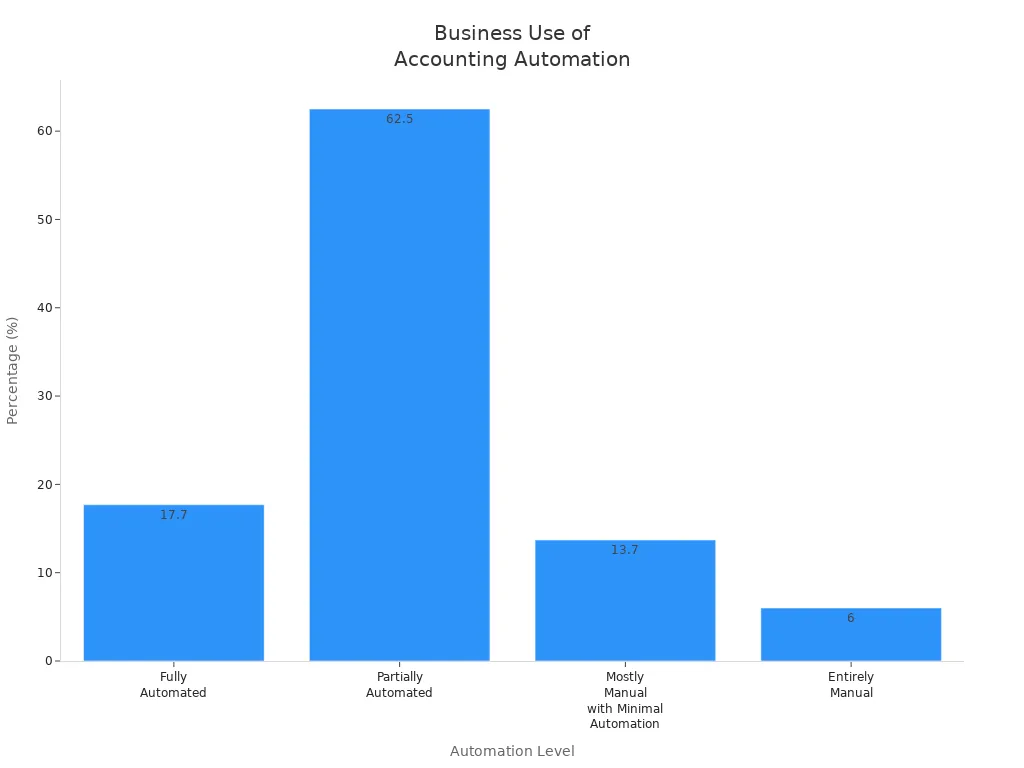
Many businesses already use automation for accounting and invoicing. The table below shows the level of automation in financial tasks:
Automation Level | Percentage |
|---|---|
Fully Automated | 17.7% |
Partially Automated | 62.5% |
Mostly Manual with Minimal Automation | 13.7% |
Entirely Manual | 6% |
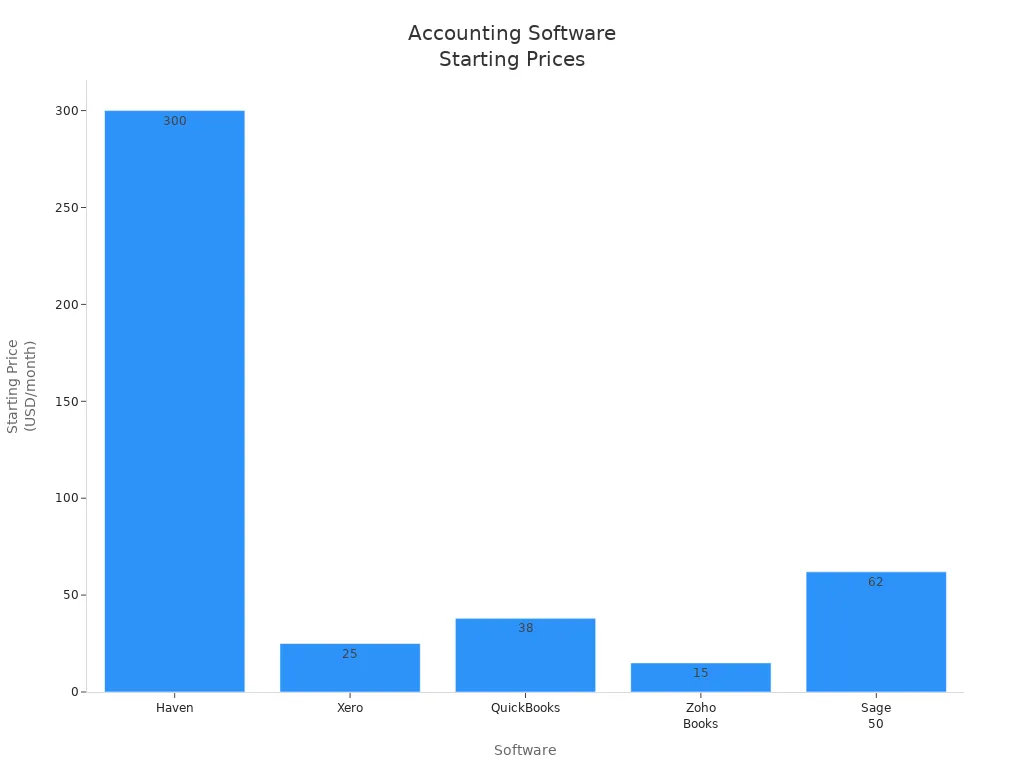
Popular accounting automation tools include QuickBooks, Xero, Zoho Books, Sage 50, and Haven. The table below compares these options:
Software | Starting Price | Key Features | Best For |
|---|---|---|---|
Haven | From $300/month | Dedicated accountant, real-time dashboard, tax handling | Startups, SMBs |
Xero | From $25/month | Unlimited users, automated bank feeds, 1,000+ integrations | Small teams, international businesses |
QuickBooks | From $38/month | Invoicing, payroll, inventory, AI automation | Small to medium businesses |
Zoho Books | Free plan; paid from $15/month | Invoicing, projects, Zoho integration | Founders on a budget |
Sage 50 | From ~$62/month | Desktop reliability, cloud backups, job costing | Product-based, multi-entity businesses |
Accounting and invoicing automation saves time, prevents errors, and supports business growth.
Overcoming Automation Challenges
Automation brings many benefits, but businesses face several common obstacles during implementation. These challenges include process inefficiencies, integration with legacy systems, high initial costs, resistance to change, and poor documentation.
Change Management
Employees often feel anxious about new technologies. They may worry about job loss or struggle to adapt. Resistance to change can slow down automation adoption. Companies can address these concerns by involving employees in the process. Open communication helps clarify misconceptions and reassures staff. Teams benefit when leaders create a culture of continuous improvement. Regular updates and clear plans encourage innovation and build trust.
Tip: Empower employees by inviting their feedback and providing support for new tools. This approach increases engagement and reduces anxiety.
Successful change management relies on tracking and measuring progress. Leaders monitor the impact of automation and share results with the team. Accessibility and support for automation tools help employees adapt quickly.
Common strategies for overcoming resistance include:
Involving employees in decision-making
Addressing concerns through open communication
Creating a culture of continuous improvement
Providing accessible support for automation tools
Managing change with clear plans and regular updates
Tracking and measuring success
Data Security
Protecting sensitive information is essential when automating business processes. Companies must audit their existing data to understand where sensitive information resides. Clear data policies ensure that automation systems align with company governance standards. Real-time monitoring allows immediate detection of sensitive data. Automated access controls restrict unauthorized access as soon as risks appear.
Note: Testing automation in a sandbox environment helps verify system performance before full rollout.
Integration with existing tools ensures that automation solutions work smoothly with other systems. These best practices help organizations maintain data security and comply with regulations.
Best practices for data security:
Audit existing data locations
Define clear data policies
Use real-time monitoring
Automate access controls
Test in a sandbox environment
Integrate with current tools
Team Training
Effective training prepares teams to use new automation tools. Automated course content creation delivers engaging eLearning materials, which improves knowledge retention. Structured learning tracks guide employees step by step or allow self-directed learning. Automated delivery and notifications reduce administrative tasks and improve efficiency. Reporting and analytics track employee progress and ensure successful training outcomes.
Training Method | Description |
|---|---|
Automated course content creation | Uses automation tools to create and deliver engaging eLearning content, enhancing knowledge retention. |
Structured learning tracks | Guides employees through training content step by step or allows for self-directed learning paths. |
Automated delivery and notifications | Automates course enrollments and sends reminders, reducing administrative burden and improving efficiency. |
Reporting and analytics | Tracks employee progress and results, ensuring effective training outcomes. |
Callout: Continuous training keeps teams confident and ready to adapt to new automation tools.
Overcoming automation challenges requires careful planning, strong communication, and ongoing support. By addressing change management, data security, and training needs, businesses can unlock the full potential of automation.
Measuring Automation Success
Tracking Time Savings
Businesses measure the impact of automation by tracking time savings. Teams compare hours spent on tasks before and after automation. They use metrics such as cycle time reduction and error reductions to see improvements. Many organizations at systems and teams have reported faster task completion and fewer mistakes after implementing automation. The table below shows common metrics used to measure time savings and efficiency:
Metric Type | Description |
|---|---|
Time Spent on Tasks | Compares hours spent on tasks before and after automation. |
Cycle Time Reduction | Measures the speed of the process before and after automation. |
Error Reductions | Tracks accuracy improvements in invoicing, scheduling, and communications. |
Evaluates revenue per hour, profit margins, and cash flow improvements. | |
Business Growth Indicators | Assesses client acquisition rates, service capacity, and revenue growth to measure expansion. |
Teams also monitor productivity by evaluating task completion rates and resource utilization. These metrics help leaders understand how automation affects business growth and financial performance.
Monitoring Stress Reduction
Automation can reduce employee stress by eliminating repetitive tasks. Companies use several methods to monitor stress levels. AI sentiment analysis detects early signs of burnout by analyzing communication patterns. Workload tracking systems monitor hours worked and task completion rates. Predictive analytics use historical data to spot potential burnout risks. Real-time feedback systems provide immediate alerts when stress indicators rise.
Method | Description |
|---|---|
Sentiment Analysis | AI tools analyze communication patterns to detect early signs of burnout. |
Workload Tracking | Systems monitor work patterns, tracking hours worked and task completion rates. |
Predictive Analytics | Machine learning models predict burnout, allowing for proactive support. |
Real-time Feedback | Systems provide immediate feedback on employee performance and stress indicators. |
Clients at systems and teams have seen measurable improvements in employee well-being. Early detection allows managers to offer support before stress becomes a problem. This proactive approach helps maintain a healthy work environment.
Continuous Improvement
Continuous improvement maximizes the benefits of automation. Leaders and employees must align their goals and commit to ongoing progress. Open communication and a culture of trust help teams identify opportunities for improvement. Adequate training and resources empower individuals to contribute effectively. Organizations celebrate successes and learn from failures to foster a growth mindset.
Strategy | Description |
|---|---|
Leadership and frontline employees align and commit to improvement. | |
Trust and Transparency | Open communication and a blame-free environment support improvement. |
Training and Resources | Investing in training empowers individuals. |
Celebrate Successes and Learn from Failures | Recognizing achievements and learning from mistakes fosters growth. |
Continuously Assess and Adapt | Regular reviews and strategy adjustments sustain improvement. |
Teams regularly review progress and adjust strategies. This approach ensures that automation remains effective and continues to deliver value. By following these strategies, businesses Automate Business Processes and achieve lasting improvements in efficiency and employee satisfaction.
Getting Started with Automation
Quick Wins
Businesses often seek fast results when they begin automating processes. Quick-win projects require minimal resources and deliver immediate benefits. Many small companies start by streamlining expense management. Digital submissions with policy checks connect expenses to accounting platforms for real-time visibility. Automated routing of approvals based on amount or category reduces reliance on email or paper-based processes. This approach saves time and improves control over spending.
Teams also automate routine tasks that consume valuable hours. Scheduling and managing social media posts across channels ensures consistent marketing. Automated lead capture, routing, and follow-up through integrated forms and CRM workflows help businesses respond quickly to new opportunities. These projects do not require complex setups and can be implemented with basic tools.
The table below highlights several quick-win automation projects:
Automation Project | Impact on Business | Effort Required |
|---|---|---|
Automating invoice reminders | Reduces manual follow-up time | Low |
Automating weekly client performance reports | High impact on client satisfaction | Low |
Automating welcome email sequences | Enhances user activation and engagement | Minimal |
Streamlining expense management | Improves visibility and control over spending | Moderate |
Automating social media post scheduling | Saves time and ensures consistent marketing | Low |
Tip: Start with projects that require little effort but deliver high impact. These quick wins build momentum and confidence for larger automation initiatives.
Building a Long-Term Plan
A successful automation journey requires a clear long-term plan. Teams assemble cross-functional groups from business, IT, and operations early in the process. Stakeholders provide insights and help identify areas for improvement. Leaders secure executive buy-in to ensure support and resources.
Companies assess current workflows to find inefficiencies. They define automation goals that align with business objectives. Selecting the right business process automation tools is essential. Teams evaluate options based on features, integration capabilities, and ease of use.
The following steps guide businesses in developing a long-term automation strategy:
Engage stakeholders and secure executive buy-in.
Assess current processes and identify areas for improvement.
Define automation goals and objectives.
Choose the right BPA tools and technologies.
Develop an implementation plan with clear responsibilities and timelines.
Pilot automation solutions in a controlled environment.
Refine based on feedback and performance data.
Roll out and scale automation across high-impact areas.
Maintain flexibility and adaptability through regular reviews.
Note: Continuous monitoring ensures that automated processes stay aligned with business goals. Teams adapt strategies as needs evolve.
Regular check-ins and project management tools help track progress. Comprehensive training and ongoing support prepare employees for new systems. By starting with quick wins and building a structured plan, businesses create a foundation for lasting automation success.
Businesses can Automate Business Processes using workflow automation tools, communication and scheduling automation, and accounting or invoicing automation. These strategies deliver increased efficiency, improved customer service, cost savings, and better accuracy. The table below highlights the main benefits:
Benefit | Description |
|---|---|
Increased Efficiency and Productivity | Automating repetitive tasks saves time and reduces errors. |
Improved Customer Service | Automation helps organizations respond quickly to customer inquiries. |
Cost Savings | Reduces labor costs and increases operational efficiency. |
Improved Accuracy and Consistency | Ensures tasks are completed consistently and accurately. |
Better Compliance and Security | Helps organizations comply with regulations and secure sensitive data. |
To begin, teams should identify repetitive tasks, select the right tools, and start small. Many organizations report higher ROI when they use integrated scheduling systems and phased implementation. Automation allows employees to focus on critical tasks, reduces chaos, and increases job satisfaction.
Take the first step today. Choose one method to automate and experience less stress and more time. Reach out to us to learn how systems and teams can help achieve similar results.
FAQ
What is business process automation?
Business process automation uses technology to perform routine tasks. It helps companies save time, reduce errors, and improve efficiency. Many businesses use automation tools for tasks like invoicing, scheduling, and communication.
Which business tasks benefit most from automation?
Repetitive tasks with clear rules benefit most. Examples include data entry, invoice processing, appointment scheduling, and email reminders. Automation works best for tasks that do not require complex decision-making.
Are automation tools expensive?
Many automation tools offer affordable plans. Some provide free versions with basic features. Costs depend on the tool, company size, and required features. Small businesses often start with low-cost or free options.
How long does it take to set up automation?
Setup time varies by task and tool. Simple automations, like email reminders, take a few hours. More complex workflows may require several days. Teams should start small and expand as they learn.
Will automation replace employees?
Automation handles repetitive tasks. Employees can focus on higher-value work. Most companies use automation to support staff, not replace them. Automation often leads to new roles and opportunities.
How can a business measure automation success?
Businesses track time savings, error reduction, and improved productivity. They use metrics like task completion rates and employee feedback. Regular reviews help measure progress and identify areas for improvement.
Is automation safe for sensitive data?
Most automation tools include security features. Companies should choose tools with strong data protection and follow best practices. Regular audits and updates help keep information safe.
What are common challenges when starting automation?
Teams may face resistance to change, integration issues, or training needs. Clear communication, proper training, and choosing the right tools help overcome these challenges.


