7 Must-Have Small Business Systems for Streamlined Success

Small Business Systems help companies operate smoothly and reach goals by using proven methodology and technology. Owners gain freedom as systems automate tasks and reduce manual effort. The right resources empower teams to solve problems and improve productivity. Recent studies show that identifying pain points, implementing solutions step-by-step, and monitoring progress bring visible benefits. The table below explains how this approach supports business success:
Phase | Description | Benefits |
|---|---|---|
1 | Identify the biggest operational pain point affecting productivity or customer satisfaction. | Provides immediate, visible benefits that demonstrate the value of systematic approaches. |
2 | Select and implement one system at a time to avoid overwhelming staff. | Ensures proper adoption and identifies integration requirements. |
3 | Train team members thoroughly and document new processes. | Facilitates ongoing use and support during the adjustment period. |
4 | Monitor system performance for 30 days and gather feedback. | Tracks efficiency improvements and identifies optimization opportunities. |
Key Takeaways
Small Business Systems streamline operations and enhance productivity by automating tasks.
Identify the biggest pain point in your business to implement effective systems that provide immediate benefits.
Introduce one system at a time to ensure proper adoption and avoid overwhelming your team.
Train your team thoroughly on new systems to facilitate smooth transitions and ongoing support.
Monitor system performance regularly to track improvements and identify areas for optimization.
Invest in financial management systems to automate bookkeeping, invoicing, and reporting for better accuracy.
Utilize CRM systems to manage customer relationships and personalize communication for improved satisfaction.
Integrate different systems to create a seamless workflow, reducing manual data entry and enhancing decision-making.
Small Business Systems Overview
Why Systems Matter
Small Business Systems form the backbone of efficient operations in modern companies. These systems use technology and structured processes to handle daily tasks, reduce errors, and support growth. When a business uses systems, it can run smoothly even when the owner steps away. Teams gain the tools they need to solve problems and keep work moving forward.
Many successful companies rely on several types of systems to manage their core functions. The most common types include:
Accounting software for managing finances, automating invoicing, and tracking expenses.
Project management tools that help teams plan, track tasks, and collaborate.
Customer relationship management (CRM) systems to automate marketing, lead generation, and customer interactions.
E-commerce solutions that support online sales and inventory management.
Communication tools that improve team collaboration and customer engagement.
These systems help businesses overcome challenges such as missed deadlines, lost data, or poor customer service. By automating routine work, companies can focus on growth and innovation. Employees become more independent and productive because they have clear processes to follow.
Tip: Companies that invest in Small Business Systems often see faster problem-solving and fewer disruptions during busy periods.
Key Benefits
Implementing Small Business Systems brings measurable advantages. Industry data shows that these systems drive business growth and scalability in several ways:
Improved resource efficiency and investment capacity, which strengthens financial health.
Increased revenue growth, guiding strategic focus and supporting long-term success.
Enhanced operational efficiency, measured by profitability ratios and balanced scorecards.
Better decision-making and operational optimization through effective data and analytics.
Centralized data and streamlined strategy tracking with analytics dashboards.
Stronger internal alignment and execution by engaging employees as strategic partners.
Adaptive and informed decision-making using market insights and competitor benchmarking.
Business analysts highlight three main benefits of using these systems:
Benefit | Description |
|---|---|
Increased Revenue Growth | Guides strategic focus and supports long-term success. |
Enhanced Operational Efficiency | Identified through profitability ratios and balanced scorecards. |
Better Decision-Making | Thanks to effective data and analytics systems, leading to operational optimization. |
Small Business Systems allow companies to scale up without losing control or quality. They also help leaders make informed choices based on real-time data. As a result, businesses can adapt quickly to changes in the market and stay ahead of competitors.
Financial Management System
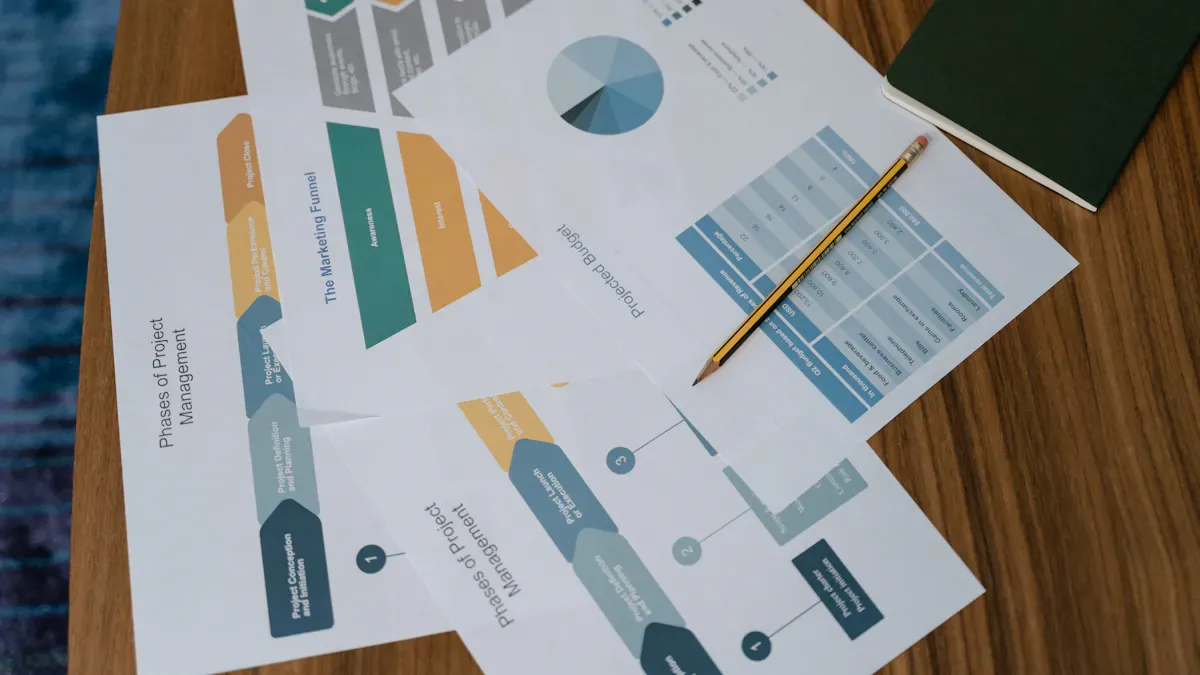
A financial management system forms the foundation of every successful business. It helps companies track money, manage expenses, and make informed decisions. By using technology, businesses can automate many financial tasks and reduce the risk of errors.
Core Functions
A strong financial management system covers several essential functions. The table below outlines these core areas and their importance:
Essential Function | Description |
|---|---|
Bookkeeping | Maintains accurate financial records and transactions. |
Expense Tracking | Monitors and records all business expenses to manage budgets effectively. |
Invoicing | Generates and manages invoices for products and services provided. |
Financial Reporting | Produces reports that summarize financial performance and position. |
Cash Flow Management | Oversees the inflow and outflow of cash to ensure liquidity. |
Integration Capabilities | Allows for seamless connection with other business systems for comprehensive data analysis. |
These functions help businesses maintain control over their finances. Financial controls also minimize accounting errors and reduce fraud risk. Robust accounting software ensures compliance with accounting rules and standards. Automated dashboards and reporting provide better oversight and support decision-making.
Automation Benefits
Automation in financial management brings many advantages. Companies that automate financial tasks see higher efficiency and accuracy. They save time and reduce manual work. Automation minimizes human involvement in repetitive tasks, which lowers the chance of mistakes. It also streamlines operations, allowing teams to focus on strategy and growth.
Automated accounting systems categorize transactions and reconcile accounts. This process improves accuracy and helps businesses make better decisions. Automated accounts payable and receivable systems eliminate manual data entry errors. They ensure precise billing and payment recording. Automation also enhances cash flow management and ensures compliance with regulations.
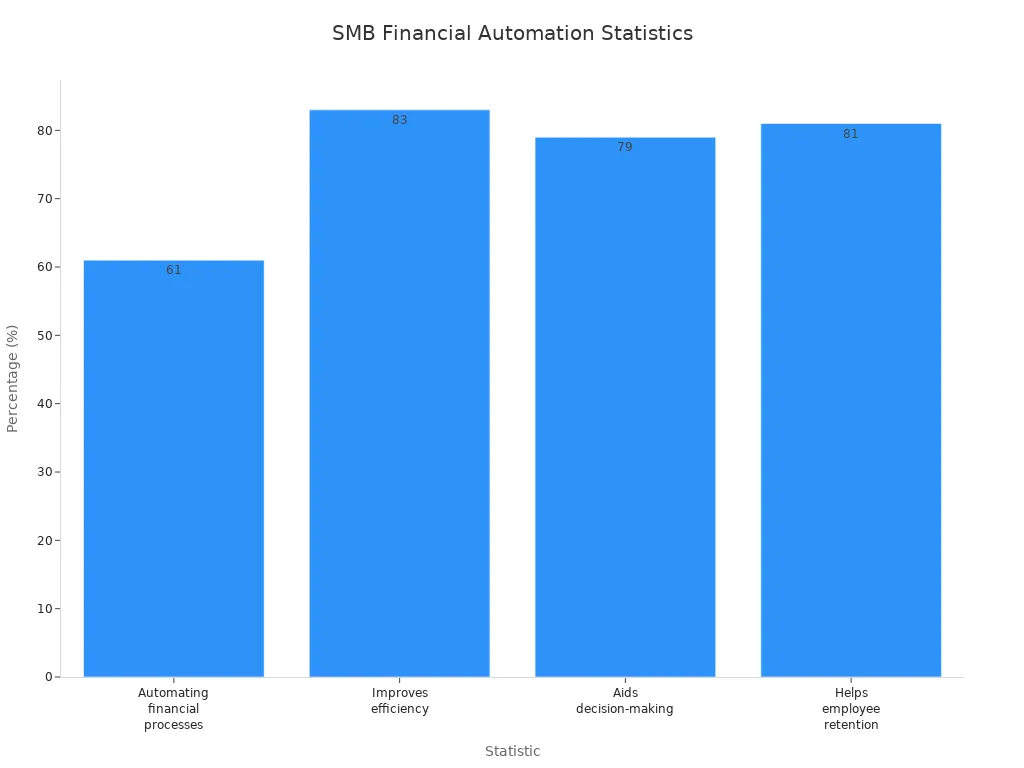
Note: According to recent data, 61% of small businesses automate their financial processes. Of those, 83% report improved efficiency, 79% say automation aids decision-making, and 81% believe automated tools help retain employees.
Implementation Tips
Accounting Software
Choosing the right accounting software is crucial. Popular options for small businesses include:
QuickBooks Online: Offers strong reporting and robust integrations.
Xero: Features a clean interface and supports third-party integrations.
Zoho Books: Provides a free plan for limited transactions and solid invoicing features.
FreshBooks: Popular among freelancers for invoicing and time-tracking.
Wave: Best for basic bookkeeping and invoicing at no cost.
These tools help automate bookkeeping, invoicing, and reporting. They also integrate with other business systems, making data management easier.
Expense Tracking
Accurate expense tracking supports better budgeting and financial planning. Automated expense tracking tools record and categorize expenses in real time. This process reduces manual entry and helps prevent errors. Many accounting platforms offer mobile apps for capturing receipts and tracking spending on the go.
Tip: Regularly review expense reports and set up alerts for unusual transactions. This practice helps maintain control and supports financial health.
Small Business Systems that include automated financial management allow companies to grow with confidence. They provide reliable data, reduce errors, and free up time for strategic work.
CRM System
Customer Data Management
A CRM system gives small businesses a single platform to store and manage customer information. Teams access customer profiles, purchase history, and communication records in one place. This centralized data helps businesses personalize their interactions and tailor services to individual needs. CRM systems make it easy to track customer preferences and engagement patterns. Companies use these insights to anticipate needs and reach out proactively. Efficient handling of customer inquiries ensures no issue goes unnoticed, which supports satisfaction and retention.
CRM systems enable personalized communication, creating stronger emotional connections with customers.
Businesses tailor marketing and service delivery based on individual preferences.
Teams analyze customer data to identify engagement patterns and anticipate needs.
CRM platforms consolidate customer data for easy access and tailored responses.
Efficient inquiry handling prevents overlooked issues and maintains satisfaction.
Companies predict future actions and engage proactively to address potential concerns.
Relationship Building
CRM systems play a key role in building lasting relationships with customers. Personalized communication makes customers feel valued and recognized. Consistent service and timely responses increase satisfaction and loyalty. Businesses identify which customers are at risk of leaving and offer solutions that resonate with them. CRM tools help teams nurture leads and transition them smoothly from marketing to sales. Sales pipeline management provides a visual overview of the sales process, helping teams monitor activities and improve performance.
Personalized communication leads to higher engagement and loyalty.
Consistent service enhances satisfaction and retention.
CRM systems help identify at-risk customers and deliver targeted offers.
Lead tracking and nurturing improve retention and sales growth.
Sales pipeline management supports monitoring and performance improvement.
Integration Tips
CRM Tools
Several CRM tools suit small businesses. Each offers unique features for automating customer interactions and managing sales processes.
Insightly: Best for businesses needing project management alongside sales.
Copper: Ideal for teams using Google Workspace, integrating with Gmail and Google tools.
Capsule CRM: Simple and user-friendly, great for contact management and sales tracking.
Freshsales: Integrates phone and email channels, designed for fast-paced sales teams.
monday sales CRM: Highly customizable, built on monday.com Work OS.
Keap: Focuses on sales and marketing automation, suitable for service-based businesses.
Less Annoying CRM: Ultra-simple platform with transparent pricing.
Sales Order Automation
CRM systems integrate with sales and marketing processes to enhance efficiency. The table below shows how integration supports business operations:
Evidence | Description |
|---|---|
Modern CRMs connect with email platforms, marketing automation, and accounting systems, streamlining workflows and consolidating data. | |
Unified Customer Records | All departments access unified customer records, minimizing miscommunication and improving customer experience. |
Real-time Visibility | CRM and ERP integrations provide real-time visibility into operations and customer journeys, supporting informed decisions. |
Small Business Systems that include CRM platforms help businesses deliver consistent customer experiences and drive sales growth. Teams collaborate more effectively, share insights, and maintain alignment across departments.
Inventory & Order Management

Stock Control
Effective stock control forms the backbone of any successful business that sells products. Inventory management systems help companies track stock levels in real time, reducing the risk of running out or overstocking. Automated solutions use barcode scanning and AI-driven forecasting to keep inventory accurate. For example, Fishbowl Inventory and Cin7 offer real-time tracking and demand forecasting, helping businesses maintain the right stock at the right time. Lightspeed provides strong onboarding and 24/7 support, making it easier for teams to adapt.
Automated inventory systems move businesses from guesswork to a single source of truth. This shift improves accuracy and saves time.
A well-managed inventory system also supports multi-location management. Brightpearl allows businesses to plan inventory across several sites and automate purchasing. Linnworks centralizes stock management across sales channels, making it easier to forecast demand and avoid costly mistakes.
Order Processing
Order processing becomes faster and more accurate with automation. Modern tools streamline the journey from order placement to shipping. Companies like Veeqo and MRPeasy help automate repetitive tasks, reducing manual errors and speeding up fulfillment. The table below highlights the impact of automation on order accuracy and fulfillment speed:
Impact Area | Description |
|---|---|
Reduced Order Fulfillment Time | Streamlining the order fulfillment process minimizes the time from order placement to shipping. |
Improved Accuracy | Automation with mobile barcoding achieves inventory accuracy above 99.9%, reducing costly errors. |
Businesses that automate order processing see fewer mistakes and happier customers. Real-time updates keep teams informed, so they can respond quickly to changes or issues.
System Integration
Integrating inventory management with accounting and CRM systems creates a seamless workflow. This integration ensures that sales, stock, and financial data stay consistent across the business. Fishbowl Inventory, for example, syncs with QuickBooks and Xero, making it easier to manage finances and inventory together.
Automation Tools
Several software options stand out for automating inventory and order management:
Software | Key Features |
|---|---|
Lightspeed | Real-time inventory tracking, strong onboarding, 24/7 support, scales with business growth. |
Fishbowl Inventory | Real-time tracking, barcode scanning, AI-driven replenishment, syncs with QuickBooks and Xero. |
Linnworks | Centralized management across channels, stock forecasting, automation tools for repetitive tasks. |
Brightpearl | Advanced inventory planning, automated purchasing, multi-location management, real-time analytics. |
Cin7 | Real-time tracking, AI-powered demand forecasting, 700+ integrations, tools for tracking costs. |
When choosing a tool, businesses should prioritize features that fit their workflow and ensure a smooth rollout with clear implementation and team training.
Process Optimization
Best practices help companies get the most from their inventory systems. The table below outlines key steps for successful integration with accounting and CRM platforms:
Best Practice | Description |
|---|---|
Conduct a Thorough Needs Assessment | Define business requirements, pain points, and goals to select a system that aligns with workflows. |
Involve Key Stakeholders Early | Include representatives from various departments to ensure the system meets practical needs and builds buy-in. |
Invest in Comprehensive Training | Provide tailored training and ongoing support to reduce mistakes and improve system use. |
Standardize Processes Before Rollout | Use the new system as an opportunity to standardize inventory handling, simplifying setup and management. |
Establish Clear Metrics and KPIs | Set measurable goals to evaluate system performance and track key metrics for improvement. |
Maintain Ongoing Support and Improvement | Plan for regular maintenance and encourage feedback to keep the system evolving with business needs. |
Tip: Standardizing processes before introducing a new system simplifies setup and helps teams adjust quickly.
By following these practices, small businesses can optimize inventory and order management, reduce errors, and support growth.
HR & Payroll System
Employee Management
Small businesses face many challenges in employee management. These include recruitment, retention, training, compliance, handling staff questions, following health and safety regulations, maintaining diversity, and keeping order. HR systems help address these issues by automating processes and tracking employee data efficiently. For example, they organize applications and candidate information, which streamlines recruitment and reduces onboarding time. HR platforms also maintain employee records and support compliance with health and safety standards. This approach allows businesses to manage their workforce more effectively and reduces administrative burdens.
HR systems simplify recruiting, hiring, onboarding, worker classification, payroll, timekeeping, and benefits administration. Teams gain access to accurate records and clear workflows, which improves communication and reduces confusion.
Payroll Automation
Payroll automation plays a vital role in small business operations. Payroll software assists companies in adhering to tax laws and labor regulations. Automation minimizes manual tasks, which lowers the risk of costly errors. Automated payroll systems calculate wages, deduct taxes, and process payments on schedule. Employees receive accurate paychecks, and managers avoid mistakes that could lead to compliance issues. Payroll automation also tracks time worked and manages overtime, which ensures fair compensation.
Automated payroll reduces compliance risks and saves time for business owners. Teams can focus on growth instead of paperwork.
Compliance Tips
HR Software
Selecting the right HR software helps small businesses automate tasks and maintain compliance. Leading solutions include:
Homebase: Offers free payroll and team management tools.
Gusto: Provides all-in-one payroll and HR features.
OnPay: Supports tax compliance and industry-specific needs.
QuickBooks Payroll: Integrates with accounting systems.
ADP RUN: Designed for growing businesses.
Software | Starting Price |
|---|---|
Homebase | |
Gusto | $40/mo + $6/employee |
OnPay | $40/mo + $6/employee |
QuickBooks Payroll | $45/mo + $5/employee |
ADP RUN | Custom (~$59+) |
These platforms automate HR tasks such as scheduling, onboarding, and benefits administration. They help businesses keep accurate records and meet legal requirements.
Payroll Tools
Payroll tools support compliance by automating calculations and reporting. They track employee hours, manage deductions, and generate tax forms. Managers use these tools to monitor payroll expenses and identify discrepancies quickly. Automated reminders ensure timely payments and filings, which reduces the risk of penalties.
Tip: Regularly review payroll reports and update employee information to maintain compliance and accuracy.
HR and payroll systems give small businesses the structure needed to manage employees, automate payroll, and stay compliant. These tools support growth and reduce stress for owners and managers.
Marketing Automation System
Campaign Management
Marketing automation systems help small businesses manage campaigns with greater efficiency. These platforms automate repetitive tasks, such as sending emails, posting on social media, and segmenting audiences. Teams use automation to nurture leads through scheduled messages and targeted offers. Automated communication keeps prospects engaged and helps businesses maintain consistent contact. This approach leads to better campaign results and higher return on investment.
Companies that use marketing automation for lead nurturing see impressive results:
80% increase in overall lead quantity.
Marketing automation also provides real-time dashboards. Teams track campaign performance, monitor workflow status, and measure productivity. These insights help businesses adjust strategies quickly and improve outcomes.
Branding & Advertising
Branding and advertising benefit from automation as well. Marketing automation tools allow businesses to schedule and deliver ads across multiple channels. Teams create consistent branding by using templates and automated workflows. AI-powered features suggest the best times to post and the most effective content for each audience. This technology helps small businesses reach more people without increasing staff.
Automated advertising platforms use machine learning to optimize ad spend. They analyze data and adjust campaigns for better results. Businesses gain better data visibility across channels, which supports informed decision-making. Automation saves time and allows teams to focus on creative and strategic work.
Implementation Tips
Marketing Tools
Selecting the right marketing automation tool is essential. The table below highlights key features to consider:
Feature | Description |
|---|---|
Workflow customization | Visual drag-and-drop builders for personalized automation sequences. |
Integration capabilities | Native connections to CRM, email, and analytics platforms. |
AI and intelligent automation | Machine learning for predictive insights and strategy optimization. |
Scalability | Ability to handle more work as the business grows. |
Real-time dashboards | Centralized view of campaign performance and team productivity. |
Popular marketing automation tools include HubSpot, Mailchimp, ActiveCampaign, and Zoho Campaigns. These platforms offer customizable workflows, integration with other systems, and real-time analytics.
Advertising Platforms
Advertising platforms like Google Ads, Facebook Ads Manager, and LinkedIn Campaign Manager automate ad delivery and reporting. These tools help businesses reach target audiences and track results. Integration with marketing automation systems ensures that data flows smoothly between platforms.
Tip: Automation tools save time on repetitive tasks and increase capacity to serve more clients without hiring more staff.
To implement marketing automation successfully, small businesses should follow these steps:
Define clear business goals, such as increasing demo bookings by 30%.
Audit all systems that interact with leads or customers, including ad platforms and CRMs.
Map the most important customer journey, identifying triggers, messages, owners, and success metrics.
Select a marketing automation platform that fits business needs and integrates with existing systems.
Marketing automation systems help small businesses run smarter campaigns, build stronger brands, and achieve better results with fewer resources.
Project Management System
Task Organization
A project management system helps small businesses organize tasks and keep projects on track. Teams use these systems to break large projects into smaller, manageable steps. Clear task lists and deadlines help everyone understand their responsibilities. Agile and Lean methodologies, such as Scrum and Kanban, encourage teams to work in short cycles. This approach allows teams to adapt quickly and improve delivery speed. When each team member knows their role, the workflow becomes more efficient.
Popular tools for organizing tasks include:
Trello: Uses boards and cards to visualize project progress.
Asana: Helps teams track tasks and deadlines with visual workflows.
Evernote: Organizes ideas and supports workflow planning.
These tools make it easy to assign tasks, set priorities, and monitor progress. Real-time resource management ensures that tasks are assigned to the right people, which helps avoid delays.
Collaboration Tools
Effective collaboration is essential for project success. Project management systems provide features that support teamwork, even for remote or distributed teams. Improved communication tools, such as chat and file sharing, help team members stay connected. Clear role definitions and shared calendars keep everyone aligned.
Common collaboration tools include:
Basecamp: Offers document management, scheduling, and team messaging in one platform.
Slack: Integrates with project management tools and supports real-time communication.
Flow: Provides a user-friendly interface for managing projects and team discussions.
These platforms help teams share updates, ask questions, and solve problems together. Agile frameworks like Scrum and Kanban also support collaborative processes, making them suitable for virtual teams. Teams can work in sprints, breaking projects into smaller tasks for better focus.
Workflow Tips
Project Software
Choosing the right project management software can streamline business operations. Look for features such as task automation, visual dashboards, and integration with other business systems. Automation saves time and reduces human error by handling routine tasks. Real-time updates keep everyone informed and prevent miscommunication.
Tool | Key Features |
|---|---|
Basecamp | Document storage, scheduling, chat |
Trello | Visual boards, task tracking |
Asana | Workflow visualization, automation |
Document Storage
Secure document storage is vital for project management. Many systems offer cloud-based storage, making it easy to access files from anywhere. Teams can organize documents by project, share files, and control access. This organization prevents important information from being lost or overlooked.
Tip: Automated workflows help businesses scale by adapting to increased workloads without extra resources. They also ensure tasks are completed consistently and accurately.
Project management systems improve productivity, enhance collaboration, and support timely project delivery. Small businesses that use these systems can manage projects more effectively and achieve better results.
IT & Data Security System
Technology Integration
Small businesses rely on technology to operate efficiently. Many companies use Windows as their main operating system because it offers compatibility with popular business software and tools. Windows supports integration with accounting, CRM, and inventory systems. Teams can connect devices and share files easily. Cloud solutions help protect valuable data and support remote work. Businesses use cloud storage to back up files and access information from anywhere.
Description | |
|---|---|
Use Cloud Solutions | Protects valuable data and supports remote work. |
Implement Access Control Measures | Protects digital and physical resources by defining role-based permissions and using MFA. |
Conduct Employee Training | Educates employees on cybersecurity best practices to prevent data breaches. |
Ensure Compliance with Legal Requirements | Helps maintain data security and builds customer trust through organized data management systems. |
Tip: Companies should choose technology that integrates smoothly with their existing systems. This approach reduces disruptions and improves productivity.
Security Practices
Security threats can harm small businesses. Phishing attacks trick users into sharing sensitive information. Malware can steal or damage data. Insider threats come from employees or former staff. Ransomware locks files and demands payment. Weak passwords make systems easy to hack.
Description | Mitigation Strategies | |
|---|---|---|
Phishing | Deceptive messages tricking users into revealing sensitive information. | Awareness training, email security software, multi-factor authentication. |
Malware attacks | Malicious software that can steal, monitor, or damage data. | Awareness, avoid suspicious attachments, use antivirus and anti-spam software. |
Insider attacks | Malicious acts by employees or former employees. | Limit access, enforce policies, track user actions, promote a cybersecurity culture. |
Ransomware attacks | Malware that encrypts files and demands ransom for decryption. | Use endpoint protection, maintain backups in the cloud. |
Weak passwords | Simple or reused passwords that are easy to guess. | Implement strong password policies, provide training, and enforce password lockout policies. |
Small businesses can protect themselves by following these practices:
Spot phishing emails and avoid suspicious downloads.
Use strong passwords and enable multi-factor authentication.
Train employees on good internet browsing habits.
Protect sensitive vendor and customer information.
Note: Regular employee training helps prevent data breaches and builds a culture of security.
System Maintenance
Operating Systems
Windows remains a popular choice for small businesses. It offers regular security updates and supports many business applications. Companies should keep their operating systems updated to fix vulnerabilities. Automatic updates help maintain system security. Businesses can use Windows Defender for built-in protection against malware.
Data Protection Tools
Data protection tools help secure business information. Antivirus software scans for threats and blocks harmful files. Firewalls control network traffic and prevent unauthorized access. Backup solutions store copies of important data in the cloud. Access control tools define user permissions and limit who can view sensitive information.
Tip: Businesses should schedule regular system checks and backups. This practice ensures data stays safe and systems run smoothly.
Small businesses that invest in IT and data security systems reduce risks and protect their operations. Strong technology integration and security practices help companies grow with confidence.
System Integration & Growth
Connecting Systems
System integration brings together different business tools into a single, connected environment. When systems work together, companies see faster processes and fewer mistakes. Employees no longer need to enter the same data in multiple places. Instead, information flows automatically between platforms. This change saves time and reduces errors.
A connected system also gives leaders access to real-time data. They can make better decisions because they see accurate information from all parts of the business. Teams spend less time on manual tasks and more time on important projects. The table below highlights the main benefits of system integration:
Benefit | Description |
|---|---|
Streamlined Processes | Integration reduces manual work and minimizes effort, leading to more efficient operations. |
Improved Data Accuracy | Accurate data access enhances decision-making and operational performance. |
Increased Productivity | Employees can focus on strategic tasks, boosting overall productivity and reducing costs. |
System integration automates data flows and increases productivity. It also helps teams respond quickly to changes in the market. When all systems communicate, businesses can adapt and grow with confidence.
Tip: Automating data sharing between systems helps teams avoid duplicate work and focus on growth.
Scaling Operations
As a business grows, it needs to add new systems or upgrade existing ones. Scaling operations requires a clear plan. Companies should follow a step-by-step approach to make sure each new system fits their needs and supports future growth.
A simple process for prioritizing and implementing new systems includes:
Conduct Thorough Market Research
Companies start by learning about available solutions and how they fit business needs.Establish Clear, Measurable Goals
Leaders set specific targets for what the new system should achieve.Develop Tactical Plans
Teams create action steps for selecting, installing, and using the new system.Monitor Key Performance Indicators
Managers track progress using data and adjust plans as needed.Prioritize Testing and Automation
Businesses test new systems before full rollout and automate as many tasks as possible.Communicate Strategic Objectives
Leaders share goals and plans with the team to ensure everyone understands the changes.Remain Agile to Changes
Companies stay flexible and ready to adjust systems as the business evolves.
Note: Regular reviews help businesses spot gaps and find new opportunities for integration.
System integration and careful planning allow small businesses to scale without losing control. By connecting systems and following a structured approach, companies improve efficiency, support growth, and stay competitive.
Implementing these seven systems increases efficiency and supports business growth. Many clients at systems and teams have achieved measurable improvements by adopting structured processes. They automate tasks and empower teams to focus on important goals. Readers can evaluate current systems and identify areas for improvement. Automation and integration offer long-term benefits. Small Business Systems provide a foundation for sustainable success. Those interested in learning more can reach out for guidance.
FAQ
What are small business systems?
Small business systems use technology and structured processes to manage daily operations. They help companies automate tasks, improve efficiency, and support growth. Teams rely on these systems to solve problems and keep work organized.
How do automated systems reduce errors?
Automated systems handle repetitive tasks with consistent rules. They minimize human mistakes by tracking data and following set procedures. Companies see fewer errors in accounting, inventory, and payroll when they use automation.
Which system should a business implement first?
Experts recommend starting with the system that addresses the biggest pain point. Financial management often comes first because it affects every part of the business.
Can these systems work together?
Yes, integration connects different systems. Data flows automatically between platforms, reducing manual entry. Businesses gain real-time insights and improve decision-making when systems communicate.
Are these systems expensive for small businesses?
Many systems offer affordable plans. Some tools provide free versions with basic features. Companies can choose solutions that fit their budget and scale as they grow.
How do systems help teams work independently?
Systems give teams clear processes and access to information. Employees solve problems without waiting for the owner. This independence boosts productivity and supports business growth.
What security measures protect business data?
Businesses use strong passwords, multi-factor authentication, and regular backups. Security software scans for threats. Employee training helps prevent data breaches.
How often should companies review their systems?
Companies should review systems at least once a year. Regular checks help spot gaps, improve processes, and ensure systems meet current needs.


