Business Automation can solve your daily problems

Business Automation helps companies manage repetitive tasks and reduce workflow errors. Many organizations use software solutions to improve efficiency. Clients and customers benefit from faster service and better quality control. Studies show that two-thirds of businesses experience better customer satisfaction and lower operating costs after automation. Nearly 90% of employees report increased productivity. Companies often save between 25-50% on labor costs and reduce operational expenses by 30-40%. Optimization Steps allow teams to streamline processes and achieve significant budget improvements.
Key Takeaways
Business automation reduces repetitive tasks, allowing employees to focus on more valuable work.
Automated systems can save companies 25-50% on labor costs and reduce operational expenses by 30-40%.
Automation improves communication by minimizing email overload and ensuring timely updates among team members.
Implementing automated scheduling tools can streamline meeting arrangements and prevent double bookings.
Robotic Process Automation (RPA) enhances accuracy by eliminating human errors in data handling and processing.
Monitoring key metrics helps organizations measure the success of automation and make informed adjustments.
Training employees on new automation tools is crucial for maximizing efficiency and minimizing resistance.
Custom automation solutions can be tailored to meet specific business needs, ensuring flexibility and growth.
Daily Business Challenges

Repetitive Work
Many businesses face repetitive tasks every day. Employees often spend a large part of their week on activities that do not require creative thinking. These tasks can slow down progress and reduce job satisfaction.
Data Entry
Data entry remains one of the most time-consuming activities in offices. Workers must input information into spreadsheets, databases, or forms. This process can take hours and often leads to fatigue. The following table shows how much time employees spend on repetitive work:
Source | Percentage of Time Spent on Repetitive Tasks |
|---|---|
ProcessMaker (2024) | 50% of work time spent on creating/updating documents |
Clockify (2025) | 62% of time spent on repetitive tasks |
OnTheClock | 50% of time spent on repetitive tasks, including 8.5 hours/week on file organization and emails |
Business Automation can help reduce the time spent on these tasks by using software to handle data entry. This allows employees to focus on more valuable work.
Scheduling
Scheduling meetings, appointments, and shifts can also take up a lot of time. Manual scheduling often leads to double bookings or missed appointments. Automated scheduling tools can organize calendars and send reminders, making the process smoother and more reliable.
Communication Issues
Communication problems can disrupt workflow and cause confusion among team members. These issues often lead to mistakes and missed deadlines.
Email Overload
Employees receive dozens or even hundreds of emails each day. Important messages can get lost in crowded inboxes. Sorting and responding to emails takes up valuable time and can distract workers from their main tasks.
Missed Updates
When teams do not share updates clearly, projects can fall behind. A lack of a communication plan may cause misalignment between stakeholders and project teams. Team members may not know who to contact or when to share information. This can result in overlooked details and project delays.
"Poor communication has the potential to drive any project to one destination, and one destination only: failure."
Human Error
Mistakes happen when people handle large amounts of information or rush through tasks. These errors can affect business records and decision-making.
Record Mistakes
Manual data entry and record keeping often lead to errors. Incorrect information can cause problems for customers and partners. Fixing these mistakes takes extra time and resources.
Inconsistent Data
Different team members may enter data in various formats or forget to update records. This inconsistency makes it hard to track progress and analyze results. Automated systems can help standardize data and reduce errors.
Common daily business challenges include rising costs, lack of data insights, attracting and retaining key talent, and economic uncertainty. Addressing these issues with automation can improve efficiency and reduce risks.
Workflow Delays
Workflow delays create significant obstacles for many organizations. These delays can slow down projects, reduce team morale, and impact client satisfaction. When teams experience workflow interruptions, they often struggle to meet deadlines and maintain quality standards. Workflow delays can erode efficiency, strain teams, and negatively affect client satisfaction. These issues often go unnoticed until they start impacting performance metrics. In service-driven industries, even minor disruptions can lead to significant problems over time, such as delayed court filings in legal offices or postponed patient follow-ups in healthcare. By analyzing workflow metrics, organizations can identify these delays and implement changes that enhance both internal operations and client experiences.
Approval Bottlenecks
Approval processes often require input from multiple people. When one person holds up a decision, the entire workflow can stall. For example, a manager may need to review and approve a purchase order before a team can proceed. If the manager is unavailable, the process stops. This delay can cause frustration and slow down project progress.
Common causes of approval bottlenecks include:
Lack of clear guidelines for who approves what
Manual routing of documents or requests
Absence of automated reminders or notifications
Bottlenecks in approval processes can lead to missed opportunities and increased costs. Teams may spend extra time following up on approvals instead of focusing on productive work.
Automated approval systems can help by routing requests to the right person and sending reminders. These systems also track the status of each request, making it easier to spot and resolve delays.
Task Dependencies
Many business processes involve tasks that depend on the completion of other tasks. If one step takes longer than expected, every dependent task gets delayed. For instance, a marketing campaign cannot launch until the design team finishes the graphics. If the design is late, the entire campaign schedule shifts.
Task dependencies can create a domino effect:
One delayed task causes others to wait.
Teams lose momentum and motivation.
Clients or customers may experience service delays.
A clear workflow map helps teams understand which tasks depend on others. Automated workflow tools can track progress and alert team members when a task is ready to begin. This visibility reduces confusion and helps teams stay on schedule.
Identifying and addressing workflow delays allows organizations to improve productivity and deliver better results for clients.
By focusing on approval bottlenecks and task dependencies, businesses can streamline their processes and reduce costly delays. Automation plays a key role in keeping workflows moving and ensuring that teams meet their goals.
Business Automation Solutions

Business Automation solutions help organizations address daily challenges by using technology to manage tasks, processes, and data. These solutions support systems and teams in achieving greater efficiency, reducing errors, and streamlining workflows. Many clients at systems and teams have adopted automation platforms to improve their operations and deliver better results.
Task Automation
Task automation focuses on handling single, repetitive tasks. Systems and teams often use software tools to automate activities such as scheduling, invoicing, and email responses. These tools follow specific rules to complete tasks quickly and accurately.
Software Tools
A variety of software tools exist for task automation. No-code platforms and scripts allow users to automate routine actions without programming skills. The table below shows the main categories of business automation solutions available in the market:
Automation Type | Scope | Complexity | Technology Used | Best For |
|---|---|---|---|---|
Task Automation | Single, repetitive tasks | Low | Scripts, no-code tools | Admin, HR, Finance |
Workflow Automation | Multi-step processes | Low | No-code platforms, workflow tools | HR, Operations, Healthcare, Construction, Banking, Insurance |
RPA | High volume tasks | Medium | Software bots | Manufacturing, Industrial-heavy industries |
Hyper-automation | End-to-end processes | High | RPA + AI + ML + low code/no code platforms | Large global corporations with complex enterprise needs |
Intelligent Automation | Cognitive, adaptive tasks | High | AI (ML, NLP, CV) + RPA | Data-heavy industries |
Systems and teams use these tools to automate scheduling, data entry, and document creation. This reduces the time spent on routine operations.
Benefits
Task automation offers several benefits:
Employees spend less time on repetitive work.
Fewer manual data entry mistakes occur.
Teams can focus on creative and problem-solving tasks.
Workflows become smoother, leading to better customer experiences.
Evidence | Explanation |
|---|---|
Task automation tools handle repetitive tasks following specific rules. | This automation improves efficiency and reduces errors, allowing employees to focus on more complex work. |
Automating tedious actions frees up time and energy. | This enables employees to concentrate on tasks that require creativity and problem-solving, enhancing overall productivity. |
Workflow Automation
Workflow automation manages multi-step processes across departments. Systems and teams use workflow automation to connect tasks, people, and data in a seamless flow.
Streamlined Processes
Workflow automation simplifies document management and data organization. Automated workflows execute tasks with speed and accuracy, reducing delays and errors. The following chart shows the measurable benefits of implementing workflow automation in business processes:
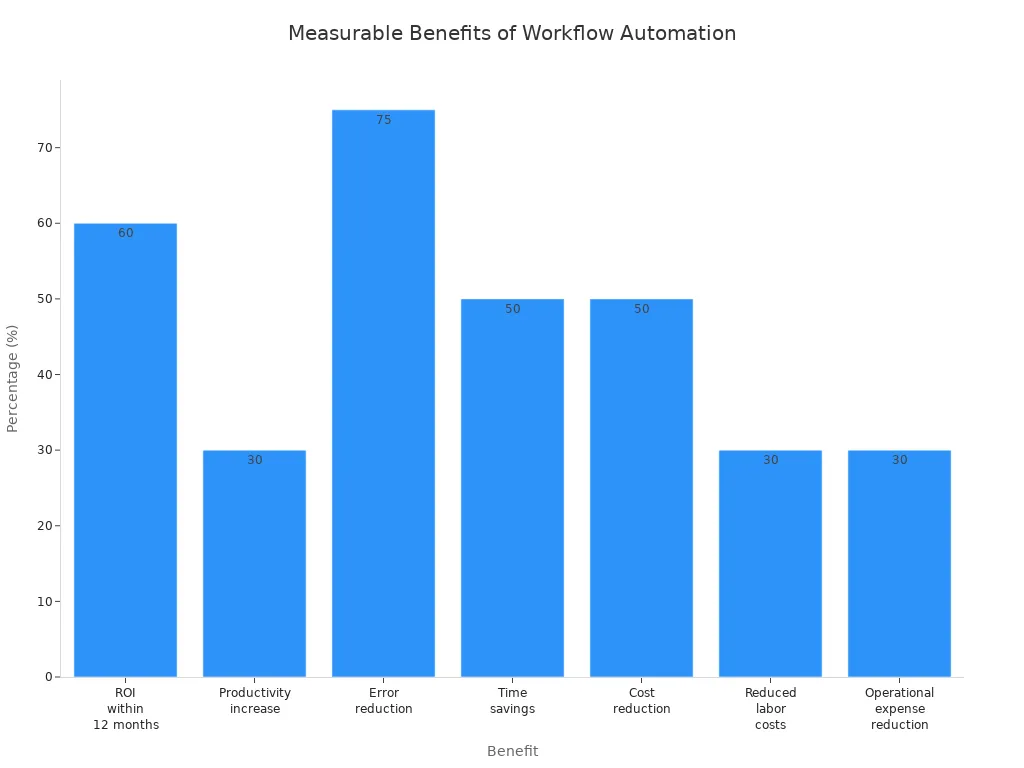
Benefit | Statistic |
|---|---|
ROI within 12 months | 60% of organizations |
Productivity increase | 25-30% in automated processes |
Error reduction | 40-75% compared to manual processing |
Time savings | 50% of time saved according to IT leaders |
Cost reduction | 10-50% reported by businesses using BPA |
Reduced labor costs | 30% of business leaders report this |
Operational expense reduction | 30% by 2024 with hyper-automation technology |
Workflow automation leads to enhanced document management, improved employee satisfaction, and superior customer service.
Approval Automation
Automated approval systems route requests to the right person and send reminders. These systems track the status of each request, making it easier for teams to spot and resolve delays. Approval automation helps systems and teams avoid bottlenecks and maintain project momentum.
Robotic Process Automation (RPA)
Robotic Process Automation uses software bots to handle high-volume tasks. RPA differs from traditional business process automation in several ways.
Automated Data Handling
RPA bots imitate human actions to execute tasks such as data entry, invoice processing, and report generation. These bots operate in virtual environments and do not require physical machines. Systems and teams use RPA to scale operations quickly and customize solutions for specific needs.
Feature | Robotic Process Automation (RPA) | Traditional Business Process Automation |
|---|---|---|
Ease of Scalability | Easily scalable; can adjust resources as needed. | Requires significant time and effort to scale. |
Customization | High level of customization; easy to create specific bots. | Limited by APIs; complex to configure updates. |
Human Imitation | Imitates human actions for task execution. | Executes predefined instructions without human imitation. |
Cost Efficiency | Higher initial costs, but long-term benefits outweigh costs. | Costlier to maintain due to complex integration. |
Accuracy | High accuracy; no human errors. | Potential for human errors in task execution. |
Programming Skills Required | No programming skills needed; user-friendly. | Requires knowledge of programming languages. |
Physical Machines | Does not require physical machines; operates in virtual space. | May require physical machines for simultaneous tasks. |
Error Reduction
RPA delivers high accuracy and eliminates human errors. Systems and teams report fewer mistakes in records and faster processing times. This leads to improved compliance and better decision-making.
Leading Platforms and Automation Specialists
Platforms like UiPath offer advanced features for Business Automation. UiPath helps systems and teams map workflows, automate tasks, and manage exceptions. Automation specialists guide organizations through the setup and optimization of these platforms.
Feature | Description |
|---|---|
Unveil Opportunities | Comprehends business processes, maps workflows, and manages automation ideas. |
Automate and Innovate | Uses UI and API for automation, with low-code tools for rapid development and intelligent document processing. |
Enhance Collaboration | Bridges human and digital workers, allowing for collaborative efforts through various deployment options. |
Screen Scraping | Extracts data from UI elements and documents using multiple methods like FullText, Native, and OCR. |
Citrix Automation | Integrates with Citrix for secure automation, simplifying management and deployment of software robots. |
API Integration | Offers a wide user range and extensive connector catalog for automating workflows across various platforms. |
Exception Handling | Provides robust error handling capabilities to ensure smooth execution of automation workflows. |
Enterprise-grade UiPath Automation Cloud™ delivers a foundation for mission-critical automation programs.
SAP Endorsed Certification ensures automation across organizations for critical ERP workflows.
New unattended robot configuration enhances role and permission management.
Automation specialists help systems and teams select the right tools, map workflows, and train employees. Their expertise ensures successful implementation and ongoing support.
Business Automation solutions empower organizations to achieve measurable improvements in efficiency, accuracy, and workflow management. Systems and teams that embrace these technologies experience faster operations, fewer errors, and better outcomes for clients.
Communication and Collaboration Automation
Automated Notifications
Automated notifications play a key role in keeping teams informed and connected. These notifications send alerts, updates, and reminders without manual effort. As a result, employees receive timely information and can act quickly. Automated notifications also help reduce the need for constant follow-ups, which saves time and energy for everyone involved.
Evidence Type | Description |
|---|---|
Streamlining Workflows | Automated notifications help in automating alerts, updates, and reminders, ensuring timely communication and reducing manual follow-ups. |
Improving Customer Interactions | They enable personalized and targeted messaging, ensuring that the right message reaches the right person at the right time. |
Managing Escalations | Real-time updates and task assignments facilitate better coordination among team members, enhancing responsiveness. |
Promoting Internal Collaboration | Keeping employees informed fosters teamwork and drives operational efficiency. |
Automated notifications minimize time spent on repetitive tasks, enhancing overall efficiency.
They ensure that team members remain aligned without constant manual follow-ups.
By improving information flow, they reduce delays and drive better outcomes.
Automated notifications also support customer interactions by delivering the right message at the right time. This approach helps teams manage escalations and coordinate responses more effectively.
Centralized Platforms
Centralized platforms bring all communication and collaboration tools into one place. Teams use these platforms to share files, track progress, and discuss projects. This unified approach reduces miscommunication and helps everyone stay on the same page.
Streamlined communication and coordination: Centralized platforms provide a unified space for teams to communicate and collaborate, minimizing miscommunication.
Improved efficiency and productivity: Access to project-related documents in one location allows team members to work more efficiently, enhancing productivity.
Enhanced visibility and accountability: Real-time visibility into project progress fosters a culture of accountability among team members.
Helps teams respond faster: Centralized systems ensure no messages are missed, optimizing response times.
Maintain message consistency: Access to full conversation histories allows for consistent messaging across teams.
Boosts security and access control: Centralized systems help manage access to sensitive information, enhancing data security.
Time savings: Streamlined communication can improve productivity by up to 25%.
Employee engagement: Effective internal communication strategies can lead to companies being 3.5 times more likely to outperform peers.
Retention: Employees are more likely to stay when they feel connected and empowered by their tools.
Centralized platforms make it easier for teams to find information and collaborate on projects. This structure supports faster decision-making and helps organizations maintain high standards of security.
Collaboration Tools
Collaboration tools with automation features transform the way teams work together. These tools automate routine tasks, such as scheduling meetings or assigning tasks, which frees up time for more important work. Real-time collaboration allows team members to solve problems quickly and deliver projects on time.
Collaboration tools also use artificial intelligence and machine learning to automate project management tasks. For example, they can schedule meetings, allocate resources, and track deadlines automatically. This automation gives employees more time to focus on creative solutions and teamwork.
Teams that use collaboration tools with automation features often see shorter project delivery times. These tools improve productivity and help teams respond to challenges faster. As a result, organizations can deliver better results to clients and adapt to changing business needs.
Real-World Automation Examples
Invoicing Automation
Many organizations face challenges with manual invoicing, such as slow processing, lost paperwork, and errors. Automation tools help companies streamline their invoicing process, leading to faster payments and fewer mistakes. For example, Siemens used intelligent capture technology to handle a growing number of invoices and unify their systems. This change allowed them to process up to 90% of invoices without manual work and expand their operations globally. Canal Barge automated their approval process, which increased billing by 20% and improved accuracy. Axxess International adopted automated solutions during remote work, which led to better customer service and more employee involvement in process improvements.
Company | Challenges | Automation Solution | Key Results |
|---|---|---|---|
Siemens | Increased invoice volume, fragmented tech landscape with multiple OCRs. | Hyland Brainware for intelligent capture. | 30-80% increase in automation, 90% of invoices processed without manual intervention, global expansion. |
Canal Barge | Overload of paper, lengthy approval process with no visibility. | Hyland OnBase for automated approvals. | 20% increase in billing, improved billing accuracy, enhanced management visibility. |
Axxess International | Integration challenges during remote work due to COVID-19. | OnBase for AP solution and process automation. | Improved customer service, increased employee engagement in process improvements. |
Automated invoicing reduces manual work, speeds up billing, and improves accuracy for businesses of all sizes.
Inventory Management
Automated inventory management systems give businesses real-time visibility into their stock. This visibility helps teams spot problems quickly and make better decisions. Companies can track inventory across different locations and react fast to low stock levels. Automation also reduces human error, which leads to more accurate records and better order fulfillment.
Some key benefits of inventory automation include:
Time savings through real-time data updates.
Enhanced visibility across all storage locations.
Benefit | Description |
|---|---|
Lack of inventory accuracy | Inefficient management can lead to financial losses and damaged reputation due to inaccuracies. |
Error-prone workflows | Manual processes are linked to high error rates, draining profits. |
Time-consuming tasks | Picking, packing, and shipping are labor-intensive and slow. |
Limited expansion capabilities | Increased order volume requires more resources, hindering growth. |
Real-time visibility allows for immediate identification of discrepancies.
Quick reaction to low stock levels enhances fulfillment speed.
Proactive management improves customer satisfaction.
Automated inventory systems help businesses avoid costly mistakes and keep customers happy by ensuring products are always available.
Scheduling Automation
Scheduling automation transforms how businesses manage appointments, shifts, and meetings. Automated scheduling platforms assign resources, balance workloads, and send reminders without manual effort. Customers can book appointments online at any time, which improves their experience and increases satisfaction. Managers gain real-time insight into employee schedules, making it easier to assign shifts and monitor workloads.
Benefit | Description |
|---|---|
Scheduling platforms simplify resource allocation, allowing for better task assignment and workload balancing. | |
Enhanced Customer Experience | Customers can book appointments online at their convenience, improving accessibility and satisfaction. |
Streamlined Staff Management | Real-time visibility into employee schedules helps managers assign shifts and monitor workloads effectively. |
Cost Savings | Automation reduces administrative burdens and helps prevent no-shows, leading to financial benefits. |
Integration with Other Tools | Scheduling solutions often integrate with payment systems and CRM software, enhancing overall business management. |
Personalized Customer Interactions | Appointment software allows for tailored services and communication, fostering customer loyalty. |
Competitive Advantage | Businesses using modern scheduling tools appear more efficient and customer-friendly, attracting more clients. |
Automated scheduling helps businesses save time, reduce errors, and deliver a better experience for both employees and customers.
Project Management
Project management automation changes how teams plan, track, and deliver projects. Many organizations use automation tools to organize tasks, monitor progress, and communicate updates. These tools help managers assign responsibilities and set clear goals for each team member.
Automated project management platforms provide dashboards that show real-time updates. Teams can see which tasks need attention and which ones are complete. This visibility helps everyone stay focused and reduces confusion. Automated reminders notify team members about upcoming deadlines and important milestones. These alerts keep projects moving forward and prevent delays.
Automated tracking systems increase accountability. Team members know what they must do and when they must finish their work. Managers can spot problems early and adjust plans before issues grow.
Project management automation also streamlines workflows. Automated systems connect tasks and people, making it easier to share information. Teams can upload documents, leave comments, and update progress in one place. This central hub reduces the risk of missed updates and lost files.
Many organizations use automation to manage budgets and schedules. Automated tools track expenses and compare them to planned budgets. Managers receive alerts when costs approach limits. This proactive approach helps teams avoid overspending and keeps projects on track.
A table below shows key features of project management automation:
Feature | Benefit |
|---|---|
Real-time dashboards | Immediate visibility into project status |
Automated reminders | Timely alerts for deadlines and tasks |
Budget tracking | Prevents overspending |
Centralized documents | Easy access and collaboration |
Progress updates | Keeps teams aligned |
Projects that finish on time are about 60% more likely to stay within budget. Teams that use automation tools often meet deadlines because they receive regular updates and reminders. This discipline leads to better financial management and fewer surprises.
Project management automation supports proactive planning. Teams can adjust schedules and resources quickly when problems arise. Automated systems help managers forecast risks and prepare solutions before issues affect delivery.
Automation in project management improves visibility and accountability. Teams work together more efficiently and deliver better results.
Many organizations report higher satisfaction among employees who use automated project management tools. These tools reduce stress and make it easier to balance workloads. Teams spend less time searching for information and more time solving problems.
Project management automation helps organizations deliver projects on time and within budget. Teams benefit from clear communication, streamlined workflows, and better control over resources. Automation supports success in today’s fast-paced business environment.
Getting Started with Business Automation
Identify Tasks
The first step in any automation journey involves identifying which tasks to automate. Teams should begin by mapping out every process within their workflow. This means listing each touchpoint, noting who handles each step, and highlighting any bottlenecks. By doing this, teams gain a clear picture of where time and resources go each day.
A structured approach helps organizations focus on high-impact areas. Here is a step-by-step method:
Map all processes and list every step.
Identify bottlenecks and repetitive actions.
Focus on tasks that offer the highest return on investment, such as data entry or client onboarding.
Centralize data to create a single source of truth.
Design automation agents for specific problems, like customer support.
Start with a small process, gather feedback, and scale up successful solutions.
Teams should look for workflows that repeat often and are prone to errors. Tasks that consume a lot of time or have a big impact on business outcomes make good candidates for automation. Processes that integrate easily with existing systems also offer quick wins.
Tip: Start small and scale smart. Testing automation on a single process helps teams learn and adapt before expanding.
Choose Tools
Selecting the right automation tools is crucial for success. Teams should consider several criteria to ensure the chosen solution fits their needs. The following table outlines important factors to evaluate:
Criteria | Description |
|---|---|
Scalability | Check user limits, data storage, and feature restrictions. |
Customization vs. Complexity | Balance the need for custom features with the complexity of maintaining them. |
Industry-Specific Considerations | Choose tools that address unique needs in service, creative, or compliance-heavy industries. |
Cost of Customization | Consider setup time, ongoing maintenance, and training requirements. |
Smart Tool Selection Process | Gather requirements, screen options, test hands-on, and plan for implementation. |
Teams should also look for compatibility with current systems, ease of use for all members, and strong integration capabilities. Scalability ensures the tool can grow with the business. Cost-effectiveness and a clear return on investment help justify the decision.
Note: Hands-on evaluation and pilot testing can reveal how well a tool fits real-world needs.
Map Workflows
Mapping workflows gives teams a visual guide to their processes. This step involves documenting each action, input, and output. Teams should identify dependencies and decision points along the way. Visualization helps spot inefficiencies and bottlenecks that slow down progress.
Step | Description |
|---|---|
1 | Document each step, including inputs and outputs. |
2 | Identify dependencies and decision points. |
3 | Visualize workflows to find inefficiencies and bottlenecks. |
4 | Facilitate team communication for shared understanding. |
5 | Use insights to optimize and boost productivity. |
Mapping workflows reduces errors and increases productivity. Teams can allocate resources more effectively and communicate better. By clearly defining the sequence of tasks and decision points, organizations can pinpoint where automation will have the greatest impact.
By clearly defining the task sequence and decision points, business process mapping will recognize areas where automation can be implemented for repetitive and tedious processes.
Train Team
Training the team ensures everyone understands how to use new automation tools. A well-prepared team adapts faster and makes fewer mistakes. Companies often see better results when they invest in training before launching automation projects.
Effective training methods include:
Host regular meetings and workshops
These sessions keep automation at the forefront. Team members learn about new features and best practices.Create feedback loops with end-users
Employees who use the system daily can share valuable insights. Their feedback helps improve future automation efforts.Leverage external expertise
Bringing in outside specialists introduces fresh perspectives. Experts can share industry trends and advanced techniques.Track and celebrate wins
Recognizing achievements boosts morale. Celebrating progress encourages the team to embrace automation.
Tip: Training is not a one-time event. Ongoing education helps teams stay updated as technology evolves.
Courses and workshops from automation software providers offer structured learning paths. Many organizations also use online resources and certifications to build skills. Automation specialists can guide teams through complex setups and answer technical questions.
A strong training program builds confidence. Employees feel more comfortable using new tools and are more likely to suggest improvements. This culture of learning supports long-term success with automation.
Monitor Results
Monitoring results helps organizations measure the impact of automation. Tracking key metrics shows what works and where to improve. Leaders use this data to make informed decisions and adjust strategies.
The following table highlights important metrics for monitoring automation initiatives:
Metric Type | Description |
|---|---|
Business Agility | Measures how quickly a business can adapt to changes, providing insights into strategic benefits. |
Employee Satisfaction | Assesses the impact of automation on employee morale and engagement. |
Customer Satisfaction | Evaluates how automation affects customer experiences and feedback. |
Cost Savings | Immediate financial benefits that are easier to measure and provide quick insights. |
Continuous Monitoring | An ongoing strategy to identify successful initiatives and areas for improvement. |
Clear Objectives | Establishing baseline measurements to quantify improvements effectively. |
Diverse Metrics | Using a mix of indicators to capture a complete picture of automation's impact. |
Modern Platforms | Tools like Latenode automate tracking of essential metrics, simplifying the monitoring process. |
Organizations should set clear objectives before starting automation. Baseline measurements help teams see progress over time. Using a variety of metrics gives a complete view of automation’s effects.
Modern platforms can automate the tracking process. These tools collect data and generate reports, making it easier to spot trends. Continuous monitoring allows teams to celebrate successes and quickly address any issues.
Note: Regularly reviewing results ensures automation delivers lasting value. Teams can adjust their approach based on real-world data.
Overcoming Automation Challenges
Change Management
Organizations often face resistance when introducing automation. Employees may worry about job changes or feel uncertain about new technology. Leaders must address these concerns to ensure a smooth transition. Effective change management starts with clear communication. Teams benefit from multiple channels, such as town halls, team meetings, and one-on-one discussions. This approach reinforces the message and keeps everyone informed.
A successful strategy also involves employees from the beginning. When people participate in open discussions and provide feedback, they feel valued and more invested in the project. Creating a compelling story about how automation improves efficiency and opens new opportunities helps build support. Leaders should provide hands-on training and ongoing learning to ease anxieties and help employees retain new skills.
The table below outlines key strategies for managing change:
Strategy | Description |
|---|---|
Multiple Communication Channels | Use various methods to share updates and reinforce the message. |
Employee Involvement | Encourage participation and feedback to boost engagement. |
Clear Narrative | Explain how automation benefits the organization and its people. |
Comprehensive Training | Offer hands-on learning and continuous education. |
Continuous Feedback | Regularly review processes and encourage improvement. |
Change management requires ongoing effort from leadership and HR. These teams must assess training needs and gather feedback to support employees throughout the process. A strong vision and mission statement can inspire the team and clarify the goals of automation.
Data Security
Automation introduces new ways to handle sensitive information. Protecting data remains a top priority for every organization. Companies should control document access by setting clear administrative and user rights. This limits who can view, edit, or share information.
Encrypting data adds another layer of protection during automated processes. Audit trails help track changes and identify unusual activities. Organizations must also follow industry-specific compliance standards to avoid legal issues and maintain secure operations.
Steps to ensure data security include:
Set access controls for documents and systems.
Use encryption to protect sensitive data.
Maintain audit trails for all automated actions.
Follow relevant compliance standards.
By following these steps, organizations can reduce risks and build trust with clients and partners.
System Integration
Integrating automation with existing business software can be complex. Many organizations use a mix of old and new systems, which can create compatibility issues. Data silos and diverse technologies may disrupt automated workflows.
To overcome these challenges, companies should choose platforms that meet both current and future needs. Flexibility is important because business conditions can change quickly. Teams should consider more than just software features. Compliance with industry regulations and strong reporting functions are also essential.
Best practices for system integration include:
Stay up to date with industry regulations.
Embed data governance and security into every integration plan.
Select flexible platforms that can adapt as the business grows.
Invest in thorough testing and ongoing monitoring.
Focus on change management and encourage user adoption.
Continuous improvement helps organizations refine their integration strategies. By tracking performance metrics, teams can identify problems early and make necessary adjustments.
Integrating automation successfully requires careful planning, strong security, and a commitment to ongoing improvement.
Measuring ROI
Measuring the return on investment (ROI) helps organizations understand the value of business automation. ROI shows how much benefit a company gains compared to the money it spends on automation projects. This financial metric divides the net benefit by the total cost. Companies use ROI to decide if their automation efforts succeed or need improvement.
Businesses often follow a clear process to measure ROI for automation:
Cost Savings: Teams calculate how much money they save on labor and how much they reduce errors after automation.
Increased Productivity: Managers compare how long tasks take before and after automation.
Revenue Growth: Leaders track changes in revenue that result from faster or more accurate processes.
A table below shows common metrics used to measure ROI in automation projects:
Metric | Description |
|---|---|
Total system cost | The cost of each robot or automation tool, multiplied by the number needed. |
Current labor costs without robotics | The yearly cost of employees who would do the work without automation. |
Anticipated labor costs with robotics | The cost of employees needed to maintain and oversee the automated system, often about 25% of the original labor cost. |
Labor savings | The difference between current labor costs and anticipated labor costs with automation. |
ROI | Labor savings minus total system cost. |
Companies also look at other benefits, such as fewer mistakes and better customer service. These improvements can lead to higher profits and stronger business growth.
Many businesses see strong results from automation. On average, companies achieve an ROI of 240% from process automation. Most organizations recover their investment within six to nine months. Top-performing companies reach an average ROI of 390%. These numbers show that automation can deliver quick and significant financial returns.
To get the most accurate picture, organizations should track both direct and indirect benefits. Direct benefits include lower labor costs and faster task completion. Indirect benefits might include improved employee satisfaction and better customer experiences. By measuring these factors, leaders can make informed decisions about future automation projects.
Tip: Regularly reviewing ROI helps companies adjust their strategies and maximize the value of automation.
Measuring ROI gives organizations the information they need to prove the value of automation. It also helps them plan for future investments and continuous improvement.
Future of Business Automation
AI Integration
Artificial intelligence continues to shape the future of business automation. Companies now use AI to analyze data, predict trends, and make faster decisions. AI-driven predictive analytics helps organizations spot patterns and plan for changes. Hyperautomation tools combine AI with robotic process automation, allowing businesses to automate more complex tasks. Many companies choose self-hosted AI platforms to keep their data private. Dynamic data integration lets systems share information in real time. Open-source platforms like n8n give teams more flexibility and control. Augmented reality improves how people and machines work together. Edge computing processes data at the source, which speeds up decision-making.
Key trends in AI integration include:
AI-driven predictive analytics
Hyperautomation tools combining AI and RPA
Increased use of self-hosted AI platforms for privacy
Dynamic data integration
Rise of open-source platforms like n8n
Augmented reality enhancing human-machine collaboration
Edge computing enabling real-time processing at data sources
These trends show that AI will continue to drive innovation in business automation. Companies that adopt these tools can expect faster workflows and better results.
Remote Work Automation
Remote work has become a standard part of many organizations. Automation tools now help teams stay connected and productive from anywhere. Automated scheduling platforms assign meetings and send reminders. Cloud-based project management systems track progress and share updates in real time. Digital assistants handle routine questions and support employees. Secure file-sharing tools protect sensitive information while allowing easy access. Automated onboarding systems help new team members start quickly, even when working remotely.
Remote work automation reduces delays and improves communication. Teams can focus on important projects instead of spending time on manual tasks. Companies that invest in these tools see higher productivity and better employee satisfaction.
Custom Solutions
Every business faces unique challenges. Custom automation solutions allow organizations to design tools that fit their specific needs. Developers can build workflows that match company processes. Integration with existing software ensures smooth operations. Custom dashboards give leaders real-time insights into performance. Automation specialists help teams identify the best areas for improvement.
Custom solutions support growth and flexibility. As companies change, these tools can adapt to new goals and requirements. Business automation will continue to evolve, offering more options for organizations of all sizes.
Business Automation helps organizations solve daily problems and improve efficiency. Teams see cost savings, fewer errors, and smoother workflows. Many companies use automation to focus on important tasks and deliver better results. Readers can start by identifying areas for improvement and exploring automation solutions.
For more information or support, readers can reach out to our team and learn how automation can help their business.
FAQ
What is business automation?
Business automation uses technology to complete tasks that people usually do by hand. Companies use software and tools to make work faster, reduce mistakes, and save money.
How does automation help reduce errors?
Automation follows set rules and steps every time. This reduces the chance of human mistakes, such as typing errors or missed steps in a process.
Can small businesses use automation?
Yes, small businesses can use automation. Many affordable tools exist for tasks like scheduling, invoicing, and customer communication. These tools help small teams work more efficiently.
What types of tasks can be automated?
Companies can automate data entry, scheduling, sending reminders, managing inventory, and processing invoices. Automation also helps with project tracking and customer support.
Is automation hard to set up?
Most modern automation tools have simple interfaces. Many do not require coding skills. Teams can follow guides or get help from automation specialists to set up systems.
Will automation replace jobs?
Automation handles repetitive tasks. Employees can then focus on creative work and problem-solving. Automation often changes job roles instead of removing them.
How can a company measure automation success?
Companies track time saved, fewer errors, cost reductions, and improved customer satisfaction. Many use dashboards or reports to see the benefits of automation.
Are automated systems secure?
Most automation platforms use strong security features. Companies should set access controls, use encryption, and follow best practices to protect data.


